


WeatherPop Español (Aviso)
4.612.00 Reviews
App Specs
- Version
- 0.10.3.5
- Updated On
- License
- Free
- Downloads
- 50,000+
- Developer
- WeatherPop
- Categories
- Weather
- Platform
- Android
Screenshots
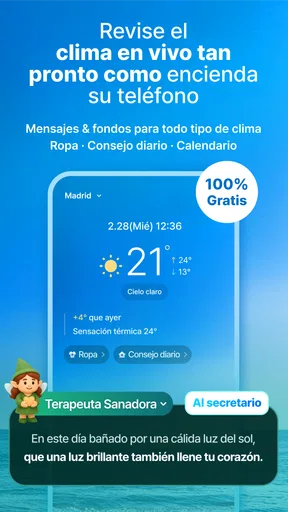
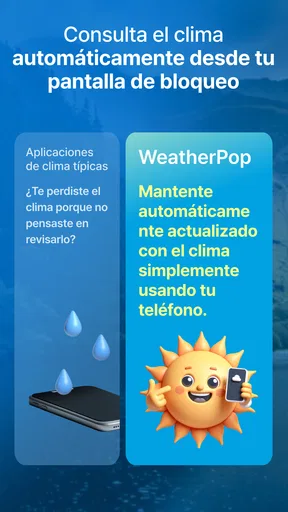
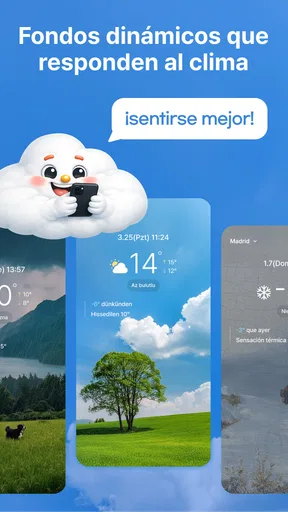
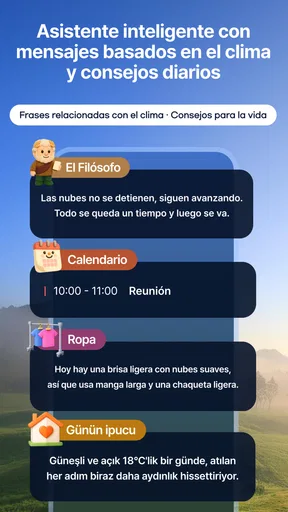
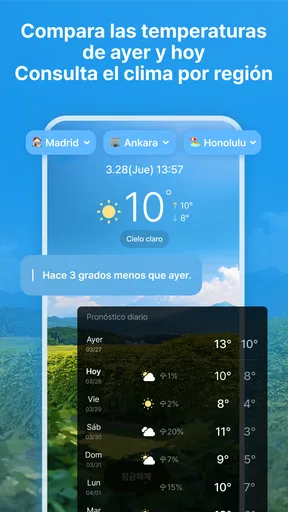
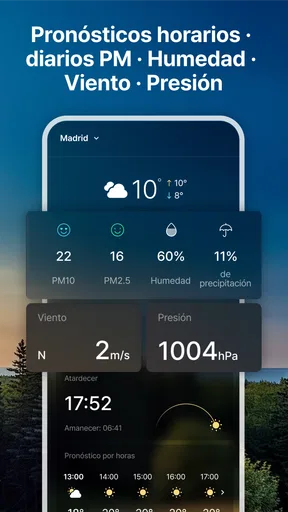

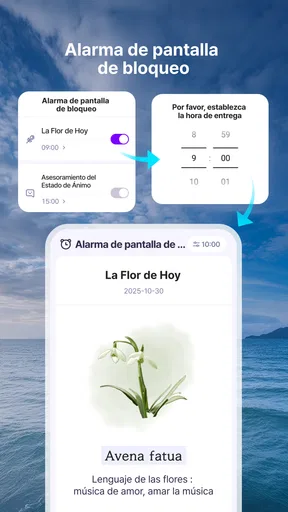
 Analysis by AppCompare
Choosing a weather app sounds simple until you need it at the right moment. I usually want three things: a quick answer, a clear view of what is coming next, and enough confidence to decide whether I should change my plans. WeatherPop Español, a free weather app from WeatherPop, takes a focused approach to that everyday problem. Its store summary presents it as a smart way to avoid missing the weather, while the short description identifies the Spanish-language experience as “WeatherPop Español.”
After spending time with it, I see its appeal less as a replacement for every weather tool and more as a practical option for people who want weather information presented in Spanish without paying for access. It is aimed at ordinary daily decisions rather than specialist forecasting. That makes it easy to approach, but it also means the right choice depends on how much detail and control you expect from a weather app.
What I looked for before trusting it
My first test was speed of understanding. A weather app can contain plenty of information and still be unhelpful if I have to search through several screens to answer a basic question. With WeatherPop Español, I paid attention to whether the presentation felt useful when I was in a hurry: checking before leaving home, deciding what to wear, or judging whether an outdoor plan needed a backup.
The second criterion was language. A Spanish interface is not merely a cosmetic change for everyone. Weather terms, warnings, and descriptions are easier to interpret when they are expressed naturally in the language I use every day. That is particularly worthwhile for family members who are less comfortable navigating an English-first app. The Spanish focus gives this app a clear identity instead of making it feel like a generic weather utility.
I also considered the balance between simplicity and depth. Some people want a compact glanceable forecast, while others compare several days, inspect changing conditions, or use weather information for travel, exercise, gardening, or work. A useful decision is not simply “is this app good?” but “does its level of information match the way I make plans?” WeatherPop Español works best when the answer is yes.
The app is listed for Everyone, which fits its straightforward subject matter and broad household use. It runs on Android version 7.0 or later, so it remains accessible to people using older compatible devices. That wider compatibility is practical, although owners of very old phones should still judge the experience by how smoothly their particular device handles any current app.
A Spanish-first experience for quick decisions
The strongest reason I would suggest trying WeatherPop Español is its directness. I do not open a weather app because I want to study meteorology; I open one because I need to make a decision. The Spanish presentation helps keep that decision grounded in familiar wording, especially when I am checking conditions quickly rather than sitting down to compare forecasts.
Worth Reading Before You Choose

EA SPORTS FC Mobile 26 Is a Bigger Football Game, but It Takes Time

Flipboard Shows What News Apps Must Do Beyond the Feed

Switching to Android Auto Means Rethinking Your Driving Routine

Google Calendar Makes a Crowded Week Easier to Manage

Ludo King Makes the Most of the Minutes Between Plans

Baby Panda World Brings Quick Play to Modern Phones, but Its Game Library Feels Busy
A realistic example is a morning commute. Before leaving, I can use the app to decide whether a light jacket makes sense, whether walking is comfortable, or whether I should take extra protection for changing conditions. Later, I might check again before heading home. That repeated, small-scale use is where a simple weather app earns its place: not through dramatic features, but by reducing hesitation at the moments when plans are still flexible.
It can also suit a shared household. If one person normally handles errands, school runs, or appointments, a Spanish-language weather app can make the information easier to pass along without translating labels or explaining unfamiliar terms. I would not treat it as a substitute for official emergency communication, but it can be a convenient everyday reference alongside those sources.
Why its current adoption matters, without overreading it
WeatherPop Español has reached more than fifty thousand installs and holds a 4.6 average from roughly three hundred ratings. Those figures suggest that the app has found an audience, and the rating is encouraging for someone deciding whether a free download is worth a trial. I would still treat ratings as a starting signal rather than a guarantee, because weather needs vary widely between users and locations.
The app was released in early January 2024 and is currently at version 0.10.3.5. That version detail is useful context: the product is still relatively young, so I would expect its direction and polish to matter as much as its present-day convenience. A newer app can feel pleasantly focused, but it may not yet have the maturity of long-established weather platforms that have accumulated extensive customization and forecasting tools.
Where WeatherPop Español earns its place
The clearest advantage is the combination of free access and Spanish presentation. There is no purchase decision to make before testing it, which lowers the cost of finding out whether its layout suits me. For a reader who mainly wants a readable weather check in Spanish, that is a meaningful benefit rather than a minor detail.
I also like the way a focused app can reduce the temptation to overanalyze. Many weather services surround a basic forecast with maps, charts, alerts, widgets, radar layers, and other panels. Those tools can be excellent, but they can also make a quick check feel heavier than necessary. WeatherPop Español is more attractive when I want the essential decision first and do not need a control room on my phone.
One non-obvious benefit of that focus is consistency of habit. If the app is easy to understand, I am more likely to check before leaving instead of relying on memory or guessing from the sky. That small routine can be more useful than an advanced feature I rarely open. My practical tip is to use it at two fixed points in the day—before the first outing and before the last major trip—rather than waiting until weather has already disrupted a plan.
Another useful workflow is to check conditions at the moment a plan becomes real. If I am deciding whether to dry clothes outside, walk instead of drive, or take children to a park, I would open the app immediately before committing. Weather decisions become less reliable when I check too early and assume the situation will remain unchanged. The app is most helpful as a decision aid, not as a promise that the day will behave exactly as expected.
Its broad age rating also makes it easier to recommend within a family. Someone who does not want a complicated interface can use the same general tool as a more confident smartphone user. That does not mean every person will prefer it, but it does make the app a sensible candidate for households seeking one uncomplicated Spanish weather option.
Small habits that make a simple weather app more useful
I would begin by using the app for one specific routine instead of trying to make it my only source immediately. For example, I might use it for commuting checks during the first week and pay attention to whether the information arrives in a form I can understand quickly. This trial reveals more than a casual opening because it tests the app against a repeated real-life need.
I would also avoid treating a single forecast view as absolute. Weather information is inherently changeable, and the sensible approach is to use the app to guide ordinary choices while checking official local guidance when conditions become dangerous or unusually important. That distinction is especially relevant for travel, outdoor work, and events where a wrong assumption has bigger consequences.
A further tip is to judge the app by the amount of friction it removes. If Spanish wording lets me interpret the forecast faster, that is a real strength. If I find myself wanting detailed maps, specialized warnings, or extensive planning tools, the problem is not necessarily that WeatherPop Español is poor; it may simply be outside its ideal role. Recognizing that early prevents frustration and avoids forcing one app to do every weather-related job.
When another type of weather app may fit better
People who need advanced forecasting should compare this app with more feature-heavy weather services. A dedicated radar or map application may be better for watching a storm’s movement, examining precipitation patterns, or making decisions that depend on fine local detail. I would choose that category for serious outdoor planning rather than expecting a lightweight Spanish weather app to replace it.
Travelers may also prefer an app built around multiple locations and trip organization. If I am moving between cities, checking several destinations, or planning around changing time zones, I would want a workflow designed for that task. WeatherPop Español is more naturally suited to the place I am currently using it for and to routine daily checks.
Users who depend on extensive alerts, home-screen widgets, or deep personalization should make those requirements their first filter. Those features can change how useful a weather app feels because they reduce the need to open it manually. If my priority is receiving information automatically in a highly customized format, I would compare WeatherPop Español carefully with alternatives that center their experience on notifications and at-a-glance controls.
There is also a trade-off between accessibility and technical depth. A simpler interface may be easier for a family member to understand, but a specialist user could find it limiting if they want layers of data and detailed interpretation. I would not recommend switching away from an established tool solely because this app is free; I would switch only if the simpler presentation genuinely matches my daily needs.
The same applies to people who need dependable information for safety-critical work. Hikers, marine users, emergency planners, and outdoor professionals should use sources appropriate to their risk level and location. A general weather app can support a decision, but it should not be the only basis for one when conditions could affect personal safety.
The real cost of changing your weather routine
Because WeatherPop Español is free, the main cost of switching is not money. It is habit. I may already know where everything sits in another app, have saved locations, or rely on a familiar alert routine. Moving to a new weather tool means learning whether its wording, timing, and presentation fit the way I actually check information.
That is why I would not uninstall an existing favorite on the first day. I would run both for a short comparison during normal routines, focusing on practical questions: Which one do I understand faster? Which one do I remember to open? Which one gives me enough context without making a simple decision feel complicated? This side-by-side test is more revealing than comparing feature lists.
The low financial barrier makes that experiment easy. I can try WeatherPop Español without committing to a subscription, then keep it as my main app, use it as a Spanish-language alternative for someone else in the household, or remove it if I need a more advanced tool. That flexibility is one of its strongest practical advantages.
Still, switching is not automatically worthwhile for everyone. If my current weather service already gives me a Spanish interface, the exact level of detail I need, and a reliable routine, WeatherPop Español may not change enough to justify relearning anything. Its best audience is someone who values a simpler Spanish experience or wants a free option that is easy to test.
My recommendation after using it
I recommend WeatherPop Español to Android users who want a free weather app with a Spanish-focused experience and an uncomplicated role in daily planning. It is particularly suitable for quick checks before commuting, errands, school routines, or casual outdoor activities. The Everyone content rating and support for Android 7.0 or later also make it a reasonable option for a broad range of users and devices.
I would be more cautious about recommending it as a complete weather toolkit. If I need detailed radar interpretation, extensive location management, specialized alerts, or professional-level planning, I would look at a more specialized category instead. The app’s value comes from staying approachable, and that same focus can become a limitation when my requirements grow.
WeatherPop Español is developed by WeatherPop, is free to use, and has built a positive early reception among its users. I see it as a low-risk trial rather than an automatic replacement for every alternative. Install it when your main question is, “What should I do about the weather today?” If your question is instead, “How can I analyze every layer of the forecast?” a different kind of app will probably serve you better.
My final view is straightforward: this is a sensible choice when clarity in Spanish matters more than an overloaded feature set. I would start with one everyday routine, test how quickly the information helps me decide, and keep it if it makes those checks easier. For that specific purpose, WeatherPop Español feels useful, accessible, and worth trying without asking the user to make a large commitment.
Pros
- Localized Spanish weather alerts are easy to understand at a glance.
- Useful notifications can help users prepare for sudden weather changes.
- Simple interface makes checking current conditions quick and convenient.
- Can be valuable for planning commutes
- errands
- and outdoor activities.
- Weather information is presented in a practical
- everyday-focused format.
Cons
- Alert accuracy may vary depending on location and available weather data.
- Frequent notifications could become distracting for some users.
- Some features may require location access
- affecting privacy and battery life.
- Coverage and forecast detail may differ between regions.
- The app may offer limited usefulness in areas with unstable connectivity.
FAQs for WeatherPop Español (Aviso)
What is WeatherPop Español (Aviso), and what does it do?
WeatherPop Español (Aviso) is a weather application designed for Spanish-speaking users who want quick access to current conditions and forecasts. After opening the app, you can typically check temperature, precipitation, wind, and other local details in a Spanish-language interface. Its notification or alert features are especially useful for receiving weather warnings without needing to constantly open the application.
Does WeatherPop Español (Aviso) provide weather alerts and notifications?
Yes, alerts and notifications are one of the main reasons to use WeatherPop Español (Aviso). Depending on your location and the permissions you grant, the app can notify you about changing conditions, rain, storms, or other relevant weather events. Before relying on it, review the notification settings carefully and confirm that location access and background activity are enabled so alerts can arrive on time.
Does the app require access to my location?
WeatherPop Español (Aviso) may request location permission to automatically display weather information for your current area and deliver locally relevant warnings. You can usually choose between allowing location access while using the app or permitting background access, depending on your device and operating-system version. If you prefer greater privacy, you may be able to enter a city manually, although automatic alerts could be less convenient.
Is WeatherPop Español (Aviso) free to download and use?
The application may be available to download without an upfront charge, but availability of advertising, premium functions, or optional purchases can vary by platform and region. We recommend checking the Google Play Store or Apple App Store listing before installing, particularly the in-app purchase section. Also review the permissions requested during setup, since some features may require additional access to operate properly.
Is WeatherPop Español (Aviso) available for both Android and iPhone?
WeatherPop Español (Aviso) may be offered through one or both major mobile platforms, but the exact availability can change over time and may depend on your country or device compatibility. Before downloading, search for the app by its complete name in Google Play or the App Store and verify the developer, screenshots, language, ratings, and recent update information to avoid installing an unrelated application with a similar title.


